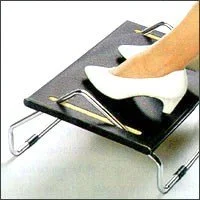
A footrest brings the floor up to you when lowering the seat would put the desktop too high.
Put both feet down while you answer your next email. Can you feel the whole sole of each foot, or are you balancing on your toes? It’s a small question with a useful answer. OSHA recommends fully supporting your feet on the floor or on a footrest when the desk height is fixed.
You can get this wrong with a very good chair. Raise the seat to meet a high desktop and your feet may hang. Lower it without checking the keyboard and you may find yourself lifting your shoulders to type. The adjustment has to work above and below the desk.
Try the two checks together
Sit back in the chair the way you actually work. Let your shoulders relax and bring your hands to the keyboard. Check your feet. If they can rest flat when the chair is a little lower and your shoulders still feel easy, try that height for a few minutes.
If lowering the seat puts the keyboard too high, use a stable footrest that supports both feet. Keep it where you naturally sit so you can use the back of the chair without reaching for it. Your feet ought to have somewhere to go even after you get absorbed in what you’re doing.
Set it up for a real task
Type a paragraph or take a short call. Notice whether one foot sneaks back around a chair leg or whether you slide forward to reach the footrest. A small change to its position may be enough. OSHA also recommends changing positions often. Settle in for the email; get up when it’s time to refill your water.
Keep exploring
Sources and image credit
OSHA | Computer workstation positions
OSHA | Chairs and foot support
Occupational Safety and Health Administration, Computer Workstations eTool, figure 3. · Reuse terms